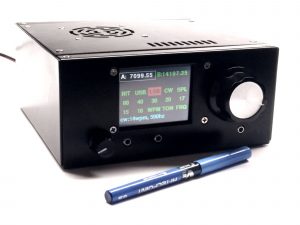
uBITX V6 amateur radio transceiver (HF Signals product photo, used for illustration only)

uBITX BFO Calibration Tool

Set the BFO for a balanced SSB audio passband · 300–3000 Hz

VU3DXRDXR Electronics Bits
HF Radio · Antennas · SDR
For the best spectrum view on phones, rotate to landscape orientation.

Live Audio Spectrum

Adjust the uBITX BFO while monitoring receiver audio. Red markers show your target edges. Prefer a line-level input for cleaner results.

Target edges Live spectrum Detected edges Reference trace

ⓘ How to Use

  1. Place the microphone near the uBITX speaker, or feed the speaker jack into a computer line input via an attenuator or isolation transformer.
  2. Click Start microphone and grant browser permission.
  3. Put the radio in SSB mode (USB or LSB) and open the BFO setting (menu path varies by firmware — stock, CEC, KD8CEC).
  4. Tune to a quiet spot so receiver noise fills the whole passband. Use speech only for the final listening check.
  5. Choose a filter preset (2.4 / 2.7 / 3.0 kHz) or set custom target edges to match your crystal filter.
  6. Adjust the BFO while watching the live spectrum and the edge/shift readouts. Aim for edges near your targets and a shift near zero.
  7. Listen for natural speech and save the radio’s setting. Many firmwares keep separate USB and LSB BFO values.

✓ What Good Calibration Looks Like

Use the spectrum as a guide, then confirm by listening. Real speech varies. A pure tone or CW produces a single peak and is less useful for balance.

✕ Signs to Recheck

Strongly one-sided energy, clipping, or a single tone all need a second look. Prefer receiver noise or varied speech.

Tips & About This Tool

  • Keep the microphone about 2–3 cm from the radio speaker, or use a line input for cleaner measurements.
  • The display shows the whole audio chain (radio + speaker + mic/room). It is a guide, not a laboratory filter response.
  • Disable noise suppression and automatic gain control if your device allows it.
  • Small BFO changes affect speech quality. Tune gradually and listen.
  • Capture a reference trace before turning the BFO so you can see the direction of change.
  • If the voice sounds too bassy, the passband is usually too low. If it sounds thin or tinny, the passband is usually too high.
  • Set the filter preset (or custom targets) to match your crystal filter so the detector looks in the right frequency range.

This browser-based analyser processes audio locally and does not upload or record anything. It does not connect to the uBITX or change the BFO automatically. Tested on current Chrome, Firefox and Edge. Safari support is best-effort. Microphone access requires HTTPS or localhost. Last selected input and target edges are remembered when storage is available. This tool is independent of HF Signals. The radio photo is used only for illustration.

Background

What the BFO does

In an SSB receiver the BFO (Beat Frequency Oscillator) re-inserts the carrier that was removed at the transmitter. Its frequency relative to the crystal filter determines which part of the audio spectrum is recovered and how the voice is pitched. A BFO that is too high or too low shifts the entire recovered passband, producing thin or muffled speech even when the filter itself is fine.

Why 300–3000 Hz

Most communication SSB filters are roughly 2.4–2.8 kHz wide. Placing the recovered audio between about 300 Hz and 3000 Hz keeps bass and treble balanced for speech intelligibility. Exact edges depend on your particular filter and firmware. The red markers are a practical starting target. Many operators prefer a slightly narrower or higher-pitched response. Adjust the target boxes until speech sounds natural to you.

Common mistakes

Tuning on a single pure tone or CW signal produces a narrow peak that does not show passband balance. Clipping the audio flattens the spectrum and hides the real edges. Aiming for a 949 Hz midpoint pulls the passband too low, so watch both edges or the shift value instead. Some firmwares store separate BFO values for USB and LSB. Check both. Menu names for the BFO setting differ among stock, CEC and KD8CEC firmware. Consult your radio’s documentation if the setting is hard to find.